Introduction
With the popularization of smart devices and the rapid development of Internet of Things (IoT) technology, NFC (Near Field Communication) tags are gradually becoming an indispensable part of modern life. They are widely used in payment, identity verification, asset management, access control systems and other fields. This guide will systematically explain how to write NFC tags and what you need to pay attention to in use, to help you better understand and apply this technology.
1. Fundamentals of NFC Technology

1.1 What is NFC Technology
NFC is a short-range wireless communication technology that allows two-way data exchange between devices within a few centimeters. It is based on the evolution of RFID (Radio Frequency Identification) and is characterized by shorter communication distances and greater security.
Main characteristics of NFC
Short-range communication: usually the communication distance is less than 10 centimeters.
Variety of operating modes: supports both active and passive communication modes.
Ease of use: fast connection without pairing.
Low power consumption: especially suitable for mobile devices and battery-powered environments.
1.2 How does an NFC Tag work
An NFC tag is a passive device containing an antenna and microchip that relies on an external NFC reader for energy to operate.
Steps in the operation of an NFC tag
Energy transfer: The electromagnetic field generated by the NFC reader provides energy for the tag.
Data exchange: the chip sends or receives data through the antenna inside the tag.
Command processing: The tag performs the corresponding tasks according to the commands the reader sends, such as returning stored data.
1.3 Types of NFC Tags
Classification by Chip
| Chip | Storage capacity | Key features | Applicable scenarios |
| NTAG213 | 144 bytes | General purpose, balanced performance | Merchandise labels, access cards,event cards |
| NTAG215 | 504 bytes | Supports larger data storage | Game cards, smart device tags |
| NTAG216 | 888 bytes | High capacity for complex applications | Industrial data tags, document tracking |
| MIFARE Ultralight | 48 bytes | Cost-effective for one-off applications | Transportation tickets, event tickets |
| MIFARE DESFire | Maximum 8KB | High security, supports complex data operations | Payment cards, access control cards |
Classification by tag type
| Tag type | Memory size | Characteristics | Read / write speed |
| NFC Type 1 | 96 bytes to 2KB | Simple data transfer for low-cost applications | 106 Kbps |
| NFC Type 2 | 48 bytes to 2KB | Cost-effective for commodity labeling | 106 Kbps |
| NFC Type 3 | 2KB to 1MB | High-speed communication for multimedia applications | 212 – 424 Kbps |
| NFC Type 4 | 4KB and above | Highly compatible to support complex payment and data applications | 106 – 424 Kbps |
| NFC Type 5 | Maximum 64KB | Long-range communication for industrial and logistics labeling | 26 Kbps |
Classification by storage capacity
| Capacity range | Functionality | Typical applications |
| < 100 bytes | Ideal for storing simple text or URLs | Merchandise information, website links |
| 100-500 bytes | Suitable for storing short messages and configuration files | Wi-Fi configuration, business cards |
| > 500 bytes | Supports complex data storage and multi-purpose use | Industrial data, complex document tracking |
2. How to write NFC Tags

Writing NFC tags is relatively simple, but it requires the right tools and a clear understanding of the tag’s capabilities. The following is a step-by-step guide.
2.1 Tools needed to write NFC tags
NFC tag: choose the tag suitable for the application scenario (e.g. Type 2, Type 4, etc.).
NFC reader/writer: Smartphone or dedicated NFC device.
Application software: Mobile phone application (e.g. NFC Tools, TagWriter) or PC-based software.
NFC-enabled device: Make sure the device supports NFC technology.
2.2 Preparation
Choosing the right tag
There are various types of NFC tags, so select the appropriate tag according to storage capacity, usage and protocol.
Install the application
Download and install suitable NFC applications, such as NFC Tools (for Android and iOS); TagWriter by NXP (professional tool); GoToTags (PC software)
2.3 Steps for writing NFC tags
Writing NFC tags using a smartphone
Turn on the NFC function: Make sure the NFC function of the phone is enabled.
Start the NFC writing software: Open NFC Tools or a similar application and select the “Write” function.
Select the type of data to be written: URL – enter a link to a website; Text – write a text message; Trigger an action – e.g. turn on Wi-Fi, send a text message, make a call, etc.
Place the tag on the back of the phone: Follow the prompts to place the NFC tag close to the NFC antenna area of the phone.
Write Completed: After the application prompts you to complete writing, test if the tag works properly.
Writing NFC tags using a PC
Connect the NFC writer: Connect the NFC writing device to the PC and install the driver.
Launch Software: Run GoToTags or other NFC writing software.
Load Data: Select NDEF format (NFC Data Exchange Format); enter data content (URL, text or other types).
Write Tag: Place the tag on the writer; click the “Write” button and wait for completion.
Verify Tag: Read the tag content to make sure it is written correctly.
2.4 How to test the NFC tag
Read with an NFC device: bring the device close to the NFC tag; verify that the tag triggers the intended action (e.g., opening a web page or sending a text message).
Check compatibility: Make sure the tag works properly on the target device.
3. Considerations for writing NFC Tags

3.1 Choosing the right type of NFC tag
Application matching: Make sure the tag type you choose meets the data storage, transmission speed and distance requirements.
Data capacity: Choose the appropriate storage capacity according to your needs. If you only need to store a short text or URL, a smaller capacity tag is sufficient; if you need to store more complex information (such as Wi-Fi credentials, contact information, etc.), you need to choose a larger capacity tag.
3.2 Make sure the NFC tag is empty
Before writing data, make sure the NFC tag is blank. If there is already other data on the tag, it may affect the new data written.
Erase old data: Some NFC tags may already have data written to them. Check if the tag can be rewritten, if it does not support rewriting (e.g. some read-only tags), a new tag will need to be used.
Erase data: If the tag supports erasure, erase the old data to avoid conflict with the new data.
3.3 Tag storage limitations
NFC tags have limited storage capacity, so when writing data, make sure that you do not exceed the maximum capacity of the tag.
Text and URL storage: Some smaller tags (e.g. Type 1, Type 2) are suitable for storing short text or links, while larger tags (e.g. Type 4) can store more information.
Check storage capacity: Before writing, make sure that the content to be stored is appropriate for the storage capacity of the tag. For example, some high-capacity tags may be suitable for storing multiple card messages, Wi-Fi credentials, or larger files.
3.4 Consider compatibility issues
NFC compatibility may vary from device to device, ensure that the NFC tag written is compatible with the target device.
Supported operating systems: Some older smartphones or devices may not support the latest NFC standards or protocols. For example, some Type 4 tags require devices that support the ISO/IEC 14443-B protocol to be read properly.
NFC capability: Make sure the target device (e.g., cell phone, reader, POS system, etc.) supports the tag type and storage format you have chosen.
3.5 Interference in the tag writing process
Avoid metal objects and sources of electromagnetic interference when writing NFC tags, as these factors will affect the writing and reading of tags.
Avoid metal interference: metal objects can shield electromagnetic fields, which can interfere with NFC signals. When writing tags, it is best to avoid placing the tag near metal surfaces.
Maintain a suitable distance: Make sure that the distance between the tag and the device is within the effective range of the NFC reader (usually a few centimeters).
3.6 Formatting and content of the data
Choosing the correct data format and ensuring that the content is correct is key to ensuring that the tag works as intended.
NDEF Format: Most NFC tags use the NDEF (NFC Data Exchange Format) format to store data. This format ensures that the data is compatible between different devices. When writing, make sure the data is written in the NDEF format.
Simple data types: For simple applications, you can write URLs, text, or Wi-Fi configuration information. Ensure that the content is accurate and avoid spelling mistakes or unnecessary spaces.
Advanced features: If the tag involves more complex data exchange or security features, ensure that the encryption options for the tag are set correctly (e.g., Type 4 tags support encryption).
3.7 Setting tag readability and writability
NFC tags can be set to be read-only or read-write. Decide the permissions of the tag according to the requirements:
Read-only tag: Once data is written, the tag will become read-only and cannot be modified. Suitable for scenarios where data tampering needs to be prevented (e.g. payment cards, identity authentication, etc.).
Read-write tag: The tag can be written multiple times and is suitable for scenarios where data needs to be updated (e.g. marketing campaigns, inventory management, etc.).
Locked Tags (read-only): Most NFC tags provide a locking feature to ensure that data cannot be changed after it has been written. This is important to prevent tampering with the tag, but once locked, the data cannot be modified.
3.8 Testing after Authoring
After authoring, it is important to test the tag to ensure that it is working properly.
Read test: Read the tag using an NFC device or application to verify that the data is stored correctly and can trigger the relevant operations correctly (e.g., opening URLs, sending SMS, etc.).
Device compatibility test: Test the tag’s reading performance on different devices to ensure that it works properly whether it is on a cell phone, reader or POS device.
3.9 Data security and encryption
Ensure that labels have appropriate security measures when handling sensitive data.
Encryption: For labels involving payment or personal information, ensure that labels with encryption (e.g. Type 4 labels) are used to protect data security.
Password protection: When writing sensitive data, password protection can be set to ensure that only authorized users can read or modify the tag content.
3.10 Environment and Tag Durability
The durability of NFC tags also needs to be considered, especially when used in harsh environments:
Choosing the right material: Choose a tag material that is resistant to high temperature, water and dust according to the environmental requirements. For example, PET or PVC tags are suitable for outdoor use, while paper tags are suitable for temporary or short-term use.
Anti-interference design: Ensure that the performance of the label is stable near metal or liquid to avoid interference from the external environment.
4. How to ensure optimal performance of NFC Tags

4.1 Choosing the right type of NFC tag
Different types of NFC tags are suitable for different scenarios, and choosing the right tag type is crucial. The type of tag determines its performance (e.g., read range, transmission speed, and storage capacity), so the first step in ensuring optimal performance of an NFC tag is to choose the right tag type.
4.2 Tag and Device Compatibility
Ensuring that the NFC tag is compatible with the target device is a key factor in ensuring optimal performance. Different devices support different types of NFC tags, especially in terms of data transmission protocols.
Protocol support: Different NFC tags follow different standard protocols (e.g. ISO/IEC 14443, ISO/IEC 15693, etc.). Make sure the tag uses the same protocol as the device, otherwise, it may not be read or written properly.
ISO/IEC 14443: Applicable to high-frequency NFC tags, which are widely used for access control cards, payment cards, etc.
ISO/IEC 15693: Applicable to long-range RFID tags, such as industrial asset management, logistics tracking, etc.
Device NFC version: Make sure your device (e.g. smartphone, NFC reader, etc.) supports the same NFC version as the tag. For example, some older cell phones may only support Type 1 and Type 2 tags, but not Type 4 or Type 5.
4.3 Installation position of the tag
The physical mounting position of the tag has a significant impact on its performance. The operating principle of NFC tags relies on the transmission of electromagnetic fields, so the correct mounting position ensures optimal read performance.
Avoid metal interference: Metal objects can shield the electromagnetic field and thus affect the performance of the NFC tag. If there are metal objects near the tag (e.g., cell phone cases, metal surfaces, etc.), the NFC signal may be interfered with, resulting in a reading failure.
Suggestion: Try to place the tag in a place where it does not come into direct contact with metal, or use a metal-protected NFC tag.
Maintain proper distance: The reading distance of NFC tags is usually between 1-10 centimeters. Make sure the distance between the tag and the reading device is moderate. Too far or too close will affect the reading effect.
Orientation of the tag: The antenna of the tag usually has the best orientation. Ensure that the antenna of the tag is aligned with the reading area of the NFC device when installing it to improve the reading success rate.
4.4 Tag quality and durability
The quality and durability of the tag directly affect its performance in different environments. Using high-quality tags not only improves the reading performance but also increases the lifetime of the tags and ensures that they work reliably for a long time.
Material selection: NFC tags are usually made of PVC, PET or paper. PVC tags are suitable for outdoor use, with strong resistance to water, oil and corrosion; PET tags are more suitable for scenarios with higher environmental requirements (e.g., industrial applications); and paper tags are suitable for short-term applications with lower costs.
Anti-interference design: Some high-quality NFC tags have an anti-metal interference design that can work stably on metal objects or liquid surfaces. Ensure that the anti-jamming performance of the tag meets the needs of the application, especially in the industrial, logistics and other fields.
Waterproof and dust-proof: The waterproof and dust-proof capability of the tag is very important for some specific industries (e.g. logistics, retail, medical, etc.). Using labels with IP67 or higher protection levels can ensure that the labels work properly in harsh environments.
4.5 Tag Write and Read Operations
The tag write and read speed is another key factor that affects the performance of NFC tags. Here are some ways to optimize write and read performance:
Write quality: When writing tags, ensure that the data is written correctly and that the data format complies with the NDEF standard. Invalid or corrupted data may result in read failure.
Recommendation: Use a specialized NFC writing device or application (e.g. NFC Tools, GoToTags, etc.) to ensure data is formatted correctly.
Read speed: The read speed of a tag is related to the processing power of the device and the type of tag. Newer devices typically have faster-read speeds, but some older devices may cause read delays.
Optimization: Use Type 4 or Type 5 tags for higher data exchange speeds. Ensure the device’s software and hardware drivers are up-to-date for optimal read speeds.
4.6 Data Security and Encryption
To ensure the security of the tag, especially when sensitive information is involved (e.g., payment information, personal identification information, etc.), encryption and password protection features need to be considered.
Encryption protection: Select tags that support encryption (e.g. Type 4 tags). Encryption effectively prevents tag data from being tampered with or read.
Password protection: Some tags (especially high-end models) allow an access password to be set so that only the device that enters the correct password can read or modify the tag content. Make sure to enable this feature when writing to protect data security.
Tamper Resistant: Some tags can be set to read-only and cannot be modified once the data has been written. This feature is suitable for application scenarios where data needs to be protected from modification.
4.7 Regular Testing and Maintenance
Even if an NFC tag works well when it is first used, it may experience some performance issues over time. Regular testing and maintenance of tags can extend their life and ensure that they always perform optimally.
Regular Read Tests: Periodically perform read tests on the tags to ensure they are working well in real-world environments. If a read failure or performance degradation is detected, replace the tag promptly.
Monitor environmental changes: If the environment in which the tags are used changes (e.g., temperature, humidity, etc.), it is necessary to reassess the performance of the tags and make appropriate adjustments.
4.8 Label locking and management of tags
Locking tags: In some critical applications, the locking function of tags prevents data from being tampered with. Ensure that the tag is set to read-only status as needed after writing the tag data. After locking, the tag’s data will not be able to be changed, ensuring data integrity.
Tag Management: In large-scale applications, it is recommended to use a tag management system (such as an RFID management platform) to manage the tags. Through centralized management, you can monitor the use of tags promptly to ensure that all tags are working properly.
Conclusion
NFC tags are being written and used to change the way modern business and life are conducted. From simple payments to complex asset management, they offer great flexibility and convenience. However, security, regulatory requirements and practical needs must be considered when selecting and using NFC tags.
RFIDLabel is committed to providing high-quality, customized NFC labeling solutions to help companies achieve digital transformation. If you are interested in our solutions, please contact us through our official website.
Recommended Product
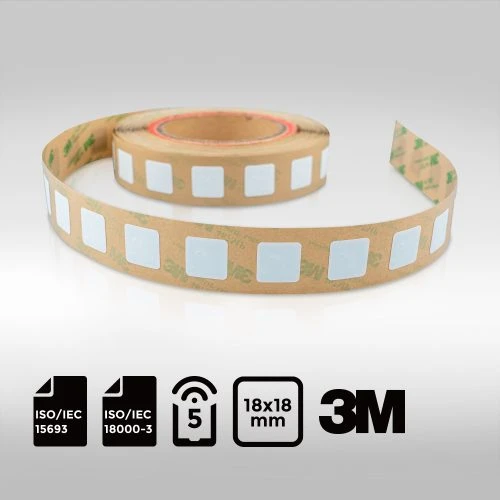
NFC Label 18x18mm NXP ICODE® SLIX | ISO15693 NFC Type-5

Elevate your tracking precision with our exceptionally compact NFC Label, sized at just 18x18mm and featuring the superior NXP ICODE® SLIX chip. Compliant with ISO15693 NFC Type-5 standards, this tiny yet mighty label is crafted with PET material and backed by reliable 3M adhesive. Experience the pinnacle of quality and efficiency in tracking solutions with this standout product.