RFID technology has been used globally in a wide range of industries in recent years, especially in logistics, retail, hospitality, and manufacturing, and its demand is growing by the day. For better asset management and tracking of goods, more and more businesses are opting to use RFID printers to customize and print labels. However, during use, RFID printers may display several error codes that can interfere with proper printing. Knowing what these error codes mean and how to fix them can help businesses solve problems quickly and keep production efficient and continuous. In this blog, we will give you a detailed overview of some common RFID printer error codes, their meanings, and the corresponding solutions.
RFID printer common error codes & meanings
In daily use, RFID printers may display some error codes which are usually displayed directly on the printer screen. The following are some common error codes and their meanings:
Error Code 101: Media Sensor Error
This error usually means that the printer cannot correctly detect the location of the RFID label or tag. Media sensors work by detecting the position of the label to ensure accuracy per print. If there is a problem with the sensor, it may cause label printing to be inaccurate or impossible to print at all.
Restoration Methods
Check that the label is placed correctly to ensure that the label does not deviate from the print track.
Clean the media sensor because dust or dirt may interfere with the sensor’s work.
If the problem persists, consider replacing the media sensor.
Error Code 202: RFID module not responding
An RFID module not responding error usually means that the RFID encoding module in the printer is not working properly. This may be caused by a hardware failure or incompatibility with software.
Restoration Methods
Restart the printer and check if the RFID module can return to normal work.
Check that the printer drivers and software have been updated to the latest version and ensure compatibility with the RFID module.
If the problem persists, you may need to contact the printer manufacturer or technical support for further hardware inspections.
Error Code 303: Print head overheating
This error is displayed when the print head of an RFID printer overheats. The print head is one of the core components of the printer and is responsible for printing information onto RFID labels. If the temperature of the print head is too high, it may lead to degradation of print quality or even damage to the print head.
Restoration Methods
Pause the print job and let the print head cool for a few minutes.
Check whether the print head needs cleaning. Long-term use may cause dirt to accumulate on the surface of the print head, which may affect heat dissipation.
If problems occur frequently, you may need to replace the print head or adjust print settings to reduce the load on the print head.
Error Code 404: label positioning error
This error indicates that the printer is unable to read the position of the RFID label correctly, possibly because the label has not been placed correctly or the sensor is not functioning properly.
Restoration Methods
Check that the label is loaded correctly and make sure there are no wrinkles or bends.
Ensure that the label sensor is not covered with dust and clean it regularly.
If the problem persists, you may need to re-calibrate the printer’s label sensor.
Error Code 505: Cannot read RFID chip
This error means that the printer has failed to successfully read the chip information in the RFID label, either because of a label quality problem or a faulty printer reader.
Restoration Methods
Replace with new RFID labels to ensure that the labels used meet the printer’s technical specifications.
Check whether the connection cord of the RFID reader is loose and reset the connection cord.
If this problem still occurs after replacing the label, you may need to contact technical support to check the RFID reader.
How to Avoid Common RFID Printer errors?
To minimize problems with RFID printers in use, businesses can take the following precautions:
Regular maintenance of printers
Regularly clean and maintain RFID printers, especially critical components such as sensors, print heads and RFID readers. Use appropriate tools and materials when cleaning to avoid scratching or damaging parts.
Use of high quality RFID labels
Ensure the use of industry-standard RFID labels and cards to avoid printing errors or unreadable chips due to label quality issues. RFIDlabel always provide our customers with industry-leading RFID labels that guarantee high quality and reliable performance.
Ensure software and firmware compatibility
Before purchasing an RFID printer, make sure that the printer’s software, drivers and firmware are compatible with your RFID label and encoding system. Regularly check and update the software to maintain optimal printer performance.
Correct printer settings
To ensure the accuracy of each print, companies should correctly set printer parameters, such as print speed, temperature and label size. If the printer’s parameters are set incorrectly, it may cause unclear label printing or other problems.
Selecting the right RFID printer & solution
RFID printers are an important tool for businesses to efficiently manage their inventory, assets and supply chain. Choosing the right RFID printer for your needs is critical, and RFID Label specializes in providing high-quality RFID solutions to help companies customize RFID printers and labels to suit their business needs.
Our product line includes custom RFID labels and supports customization in a variety of shapes, sizes and materials, suitable for asset management and inventory tracking in all types of industries. In addition to this, all of our products comply with international standards and offer eco-friendly material options to help organizations achieve efficient management while supporting sustainable development.
Conclusion
RFID printers play a vital role in the daily operations of modern enterprises. Understanding common error codes and their solutions can help enterprises improve equipment utilization and reduce downtime. If you encounter any problems or require RFID solutions, feel free to contact us. The RFIDLabel team will provide you with professional support and high-quality products to help your business succeed in the market.
FAQs
To help you better understand and use RFID printers, here are some answers to frequently asked questions:
1. Why does my printer often experience errors that the RFID module does not respond?
This may be due to incompatible firmware or a loose connection. We recommend updating the firmware and checking the connection.
2. Can I use regular labels instead of RFID labels?
No. RFID printers are designed for RFID labels. Ordinary labels do not have RFID chips for data transmission and tracking functions.
3. The printer prompts a label positioning error, what should I do?
First check that the label is correctly placed. If there are no problems, the sensor may need to be re-calibrated or cleaned.
Recommended Product
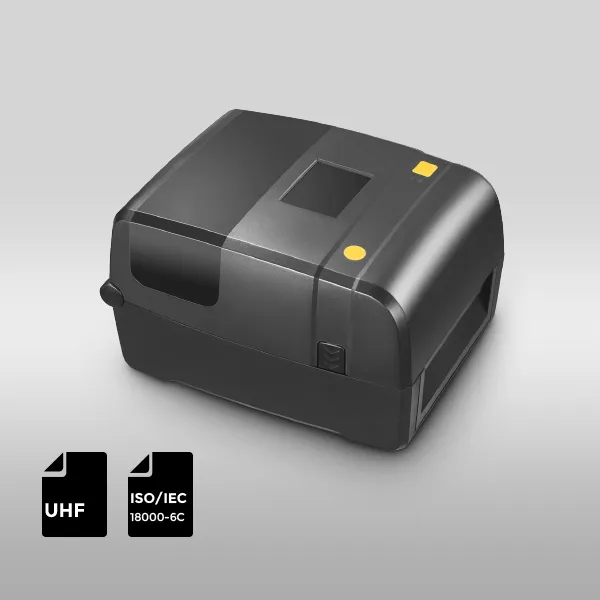
UHF RFID Printer AZ-CP30
Print speed up to 8 ips. With RFID function supporting UHF RFID, 860–960 MHz, and EPC C1G2 (ISO 18000–6C), with the function to automatically identify the printer head with 203 dpi and 300 dpi and automatically configure the printer without PC settings. With super large storage, DDR2 RAM 128 MB, Flash 256MB. Support multiple interfaces, USB HOST, B-type USB, Ethernet port for standard, Wi-Fi, and Bluetooth module for optional.