In modern warehousing, logistics, and various asset management fields, improving management efficiency and reducing human errors are top priorities for businesses. With technological advancements, RFID (Radio Frequency Identification) technology has become widely used across various industries. The integration of LED display functionality into UHF RFID labels (K5XBL) has opened up new possibilities. This article will introduce the advantages, unique features, usage steps, and practical application cases of this innovative label in real-world scenarios.
Application Scenarios and Advantages of the Label
The LED UHF RFID label (K5XBL) is an advanced product that combines LED display technology with UHF RFID technology, making it suitable for managing and tracking in various scenarios. This product’s distinctive LED flashing function demonstrates significant advantages in real-world applications, particularly in inventory management, asset tracking, equipment management, and security control.
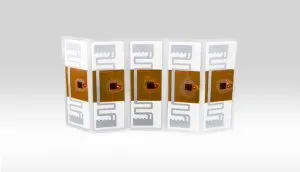
In inventory management, the K5XBL label can monitor the location and status of items in the warehouse in real-time. When a particular item needs replenishing, the LED light on the label automatically illuminates, reminding staff to take timely action, thereby enhancing warehouse management efficiency. In asset tracking, especially in managing large equipment and high-value items, the LED feature of the K5XBL label can automatically light up when equipment leaves a designated area, triggering an alert to help managers quickly locate and ensure the equipment’s safety.
Moreover, this label is widely used in tool and equipment management. For example, managing tools on a complex construction site can often be challenging. By attaching LED RFID labels to tools, managers can easily locate specific tools. The LED light can illuminate under specific conditions, such as when a tool leaves a designated area, issuing a warning signal to prevent tool loss or misuse.
The main parameters include an operating frequency between 860-960 MHz, supporting the ISO 18000-6C (EPC Gen2) standard, with a read/write distance of over 10 meters. Additionally, the label integrates a high-brightness LED light that can illuminate based on preset conditions, providing visual feedback. The label is made of industrial-grade materials, offering waterproof and dustproof features, making it suitable for use in various complex environments.
The advantage of the K5XBL label lies in its real-time visual feedback functionality. In traditional RFID systems, label status is usually only available through data systems, while the K5XBL label directly provides status prompts through the LED light’s illumination, making positioning and management more intuitive. Additionally, this label features non-contact identification, allowing data to be read and written without direct line-of-sight contact, significantly improving work efficiency.
Usage Steps
To fully leverage the functions of the K5XBL label, proper usage steps are essential. Below are detailed operational steps:
How to Write Label Data?
Writing label data is a key step in the use of UHF LED labels, ensuring that the labels can be correctly identified and used. Here are the detailed steps and logic:
Select Address and Length
- Address Selection: In UHF RFID label operations, the label address is used to indicate the data storage location. In most cases, the first 8 bits of the label are hidden, with the default read address being 2. To accurately display and edit control bit data, we select address 1 for operation. This step is crucial as it determines whether you can correctly modify and write the necessary data.
- Length Selection: The length of the label data is determined by the number of bits of the EPC (Electronic Product Code) to be written. Typically, EPC lengths are available in 96-bit, 128-bit, and 240-bit formats, corresponding to data sizes of 12 bytes, 16 bytes, and 30 bytes, respectively. Before writing data, you need to calculate the data length to be written and ensure that the length selection matches the actual data size. The length calculation formula is:
- 96-bit EPC: 12 bytes = 6 words
- 128-bit EPC: 16 bytes = 8 words
- 240-bit EPC: 30 bytes = 15 words
- PC Control Bit Settings: During the label data writing process, the PC (Protocol Control) bit setting is crucial in determining the EPC length and data format. Different EPC lengths correspond to different PC values, such as:
- 8-byte EPC: PC value is “2000”
- 12-byte EPC: PC value is “3000”
- 16-byte EPC: PC value is “4000”
- Data Content Composition: The data content consists of the PC control bit and the actual data to be written. For example, if you need to write 8 bytes of data, the data content should be set as “1000 1234 5678”, where “1000” represents the fixed PC control bit value, and “1234 5678” is the actual value to be written.
Perform the Write Operation
- Check the PC (Control Length) Option: Before performing the label data write operation, ensure that the “PC (Control Length)” option is checked in the handheld device or software settings. This allows accurate control of the EPC data length and ensures correct data writing.
- Enter Address, Length, and Data Content: Based on the previous settings, enter the corresponding address, length, and data content in the software, then perform the write operation. The system will write the data to the label according to the information you provide.
In label writing, Ptr usually stands for ‘Pointer.’ It refers to the starting position or address for the data write or read operation. In other words, Ptr defines the specific memory location (address) on the label where the data writing or reading begins.
Len typically stands for “Length.” It refers to the length of the data to be written or read, usually measured in bytes or bits. Len is used to define the number of bytes or bits involved in the data operation.

Verify the Write Result
- Read Verification: After the write operation is completed, it is recommended to immediately verify whether the data was successfully written using the read function. The read result should match the input data exactly. If there is any discrepancy, recheck and repeat the operation.

How to Illuminate the Label?
Illuminating the label is one of the core functions of UHF LED labels. By remotely controlling the LED light, users can quickly locate the desired label. Here are the operational steps:
Program Installation and Configuration
Install the LED label control software, follow the prompts to complete the installation, and then enter the illumination operation interface. Configure the reader, select the appropriate reader model (e.g., KLW-UH55EC2), and set the power to 30. You can also switch between Chinese and English interfaces as needed.


Scan, Select and Illuminate Labels
In the illumination interface, click the “Scan labels” button. The system will automatically scan and list nearby RFID labels. Once scanning is complete, click the “Stop” button to end the scanning operation.
From the scan results, select the label you need to illuminate, then click the “Illuminate” button. The selected label will light up immediately, and its LED light will flash, helping the user quickly identify the label.

Continuous Illumination Mode
If continuous label illumination is needed, you can select the “Continuous Illumination” mode. In this mode, the label will flash continuously at the set interval until you click the “Stop” button again. You can adjust the illumination interval through the “Settings” button.

Precautions
- Ensure Stable Device Connection Before Operation: Before all operations, make sure that the connection between the reader and the computer or handheld device is stable to avoid operation failure due to connection issues.
- Carefully Select labels: In multi-label operational environments, ensure that you have selected the correct label for illumination or data writing to avoid misoperation.
- Regular Maintenance and Data Backup: It is recommended to regularly maintain the equipment and save operation records for future reference.
Conclusion
In summary, the LED UHF RFID label K5XBL not only possesses all the advantages of traditional RFID technology but also enhances operational intuitiveness and convenience through its LED display functionality. By following the detailed operational steps provided above, users can fully utilize the powerful features of this label, achieving more efficient management and control in various application scenarios.
If you are looking for a solution to improve asset management and inventory control efficiency, consider adopting our innovative LED RFID labels. These high-quality labels offer unprecedented visual management tools for your business, making your operations simpler and more efficient. Visit our website at rfidlabel.com to discover the perfect solution for your needs and enjoy our professional customer support to ensure you fully leverage this cutting-edge technology!

UHF LED Non-Printable Label 74×26×1.1mm | ISO18000-6C

The LED UHF tag, renowned for its anti-metal properties and resistance to extreme temperatures, liquids, and damage, is widely used in manufacturing logistics for containers, shelves, equipment, and more. It also offer security, authentication, and traceability solutions for transportation logistics.