What is NFC on iPhone, and how is Apple’s innovative new NameDrop feature pushing the boundaries of its capabilities? Near Field Communication (NFC) has been a quiet workhorse in our daily lives, powering everything from contactless payments to quick data transfers. With NameDrop, Apple is not just adding a new feature; we are witnessing a significant evolution in how NFC can be utilized, particularly for personal and professional networking.
Other related content, read our guide :
→NFC Tags for iPhone: Everything You Need to Know
→ iPhone RFID: What You Can and Can’t Do
→ Can an iPhone Act as an NFC Tag? NFC Emulator & Shortcut Guide
The Evolution of NFC on iPhone: From Taps to Transfers
For years, what is NFC on iPhone has primarily been associated with Apple Pay. While this remains a crucial application, the underlying technology has always held far greater potential. NFC allows for short-range, high-frequency wireless communication, enabling devices to exchange data when brought within a few centimeters of each other. This simplicity and speed make it ideal for various interactions that go beyond just financial transactions.
NFC operates on the principle of electromagnetic induction, creating a small magnetic field that can be used to transfer data between two NFC-enabled devices. This can be a passive tag, like an RFID label, or an active device, such as an iPhone. The beauty of NFC lies in its minimal power consumption and rapid connection establishment, making it incredibly efficient for quick, intuitive interactions. We’ve seen this in:
- Contactless Payments: Tapping your iPhone or Apple Watch at a POS terminal.
- Public Transit: Using your device as a digital ticket.
- Smart Home Devices: Tapping to pair or control smart appliances.
- Information Exchange: Quickly sharing Wi-Fi credentials or website links.

How NameDrop Works: A Tap Away from Connection
NameDrop, introduced with iOS 17, leverages the existing NFC capabilities of the iPhone to facilitate a seamless and intuitive way to exchange contact information. Instead of fumbling with typing numbers or scanning QR codes, users can simply bring their iPhones close together to share their contact posters. This is a prime example of how what is NFC on iPhone is expanding into more personal and social applications.
When two iPhones running iOS 17 are brought close, NameDrop automatically initiates a secure connection via NFC. Users can then choose which contact information they wish to share, ranging from phone numbers and email addresses to custom contact posters. This process is not only fast but also highly visual and engaging, making the act of exchanging details a more pleasant experience. We believe this feature will significantly impact networking and social interactions, making them more efficient and enjoyable.
Key Features of NameDrop:
- Proximity-Based Sharing: Utilizes NFC for instant connection.
- Customizable Contact Posters: Personalize your sharing experience.
- Selective Information Sharing: Control what data you share.
- Secure and Private: Data is exchanged directly between devices.
The Broader Impact on the NFC Ecosystem
NameDrop’s prominence is likely to accelerate the adoption and understanding of NFC technology among a wider audience. When users experience the effortless nature of NameDrop, they will naturally become more aware of the underlying technology. This increased awareness can lead to greater demand for other NFC-enabled solutions and products.
The principles behind NameDrop can inspire new applications for NFC across various industries. Imagine:
- Event Networking: Quickly exchanging professional details at conferences.
- Retail Experiences: Tapping products to get detailed information or special offers.
- Healthcare: Seamlessly transferring patient data or accessing medical records.
- Logistics and Supply Chain: Enhanced tracking and inventory management using NFC tags.
This expansion highlights that what is NFC on iPhone is just one facet of a much larger and growing technological landscape. The ease of use demonstrated by NameDrop sets a new standard for NFC interactions, encouraging developers and businesses to explore more innovative uses for this versatile technology.

Security and Privacy in NFC Interactions
As NFC applications become more prevalent, especially with features like NameDrop, questions about security and privacy are paramount. Apple has a strong track record of prioritizing user data protection, and NameDrop is no exception. The data exchange is encrypted and requires explicit user consent, ensuring that information is shared only when intended. This focus on security is crucial for building trust in NFC-based solutions.
Best Practices for Secure NFC Use
To ensure secure NFC interactions, we recommend:
- Be Mindful of Your Surroundings: Only initiate NFC transfers in trusted environments.
- Review Shared Information: Always double-check what you are sharing before confirming.
- Keep Software Updated: Ensure your device’s operating system is current to benefit from the latest security patches.
The Future of NFC: A Connected World
NameDrop is more than just a new feature; it’s a glimpse into a future where our devices interact more seamlessly and intuitively with the world around us. The simplicity and efficiency of NFC, combined with Apple’s innovative approach, promise a future where digital and physical interactions are increasingly intertwined. We anticipate a surge in NFC-enabled products and services, making our lives more convenient and connected.
Beyond NameDrop: Potential NFC Innovations
We foresee further advancements in NFC technology, including:
- Enhanced Authentication: Using NFC for more secure logins and access.
- Augmented Reality Integration: Tapping objects to trigger AR experiences.
- Sustainable Solutions: NFC tags on eco-friendly products for detailed sustainability information.
This continuous innovation reinforces the importance of understanding what is NFC on iPhone and its broader implications for a truly connected ecosystem.

Case Study: NFC in Retail for Enhanced Customer Engagement
Beyond payments, NFC is transforming the retail experience. For instance, Meegle.com highlights how NFC-enabled kiosks allow customers to access product information, reviews, and promotions by simply tapping their smartphones. This provides an interactive and immediate way for consumers to learn more about products, enhancing their shopping journey and empowering them with information at their fingertips. This application demonstrates how NFC can bridge the gap between the physical product and digital content, offering a richer, more engaging customer experience.
Conclusion
Apple’s NameDrop feature is a testament to the evolving capabilities of NFC technology. By making contact sharing effortless and intuitive, it not only enhances user experience but also shines a spotlight on the vast potential of NFC beyond traditional payment systems. As a leading manufacturer of RFID cards and tags, we at RFIDLabel are excited by these advancements and their implications for a more connected and efficient world. If you’re looking to explore high-quality, customizable RFID solutions for your business, whether it’s hotel key cards, RFID labels, or access control systems, we invite you to visit rfidlabel.com to learn more about our products and how we can help you leverage the power of NFC and RFID technology. Our team is ready to assist you with flexible minimum order quantities and solutions tailored to your specific needs.
Other related content, read our guide :
→NFC Tags for iPhone: Everything You Need to Know
→ iPhone RFID: What You Can and Can’t Do
→ Can an iPhone Act as an NFC Tag? NFC Emulator & Shortcut Guide
Recommended Product
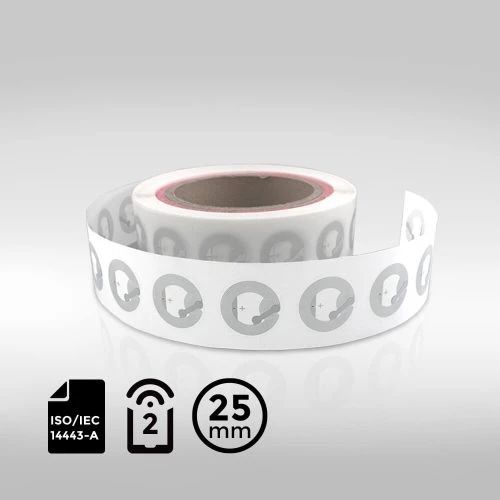
NXP NTAG® 213 PET NFC Wet Inlay ⌀25mm

Powered by the high-performance NXP NTAG® 213 chip and conforming to ISO/IEC 14443-A, NFC Type-2 standards, it benefits from faster data transfer rates and 144 bytes of user memory for enhanced data storage. This inlay excels in applications such as asset tracking, smart advertising, and secure event access, making it a smart and reliable solution for modern NFC needs.